Live edits
At a step, some commands only read files, for example pytest and git log. Other commands change files,
for example ruff format, uv lock or an editor. For the second kind, timewalk shows the changes as
they happen, beside the changes of the step itself.
An edit is a change to a tracked file that nobody has committed yet. A tracked file is a file that git records. timewalk never throws edits away. In the replay copy, a move keeps them on a saved branch, and does not ask first.
What you see
Run a command in a terminal at this step, and let it rewrite a tracked file. Within about a second, these things happen:
- The file list marks the file as edited, and the count at the top gives the number of edited files.
- The reader shows one more view, Your edits. The view shows the diff of the file against the commit of the step. A diff is the list of lines that changed.
- A click on an edited file opens it in the Your edits view.
- Every window on the page shows the same. If you open a file in the window on your screen, it also opens in the window on the projector.
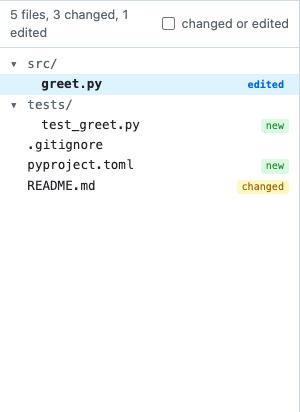
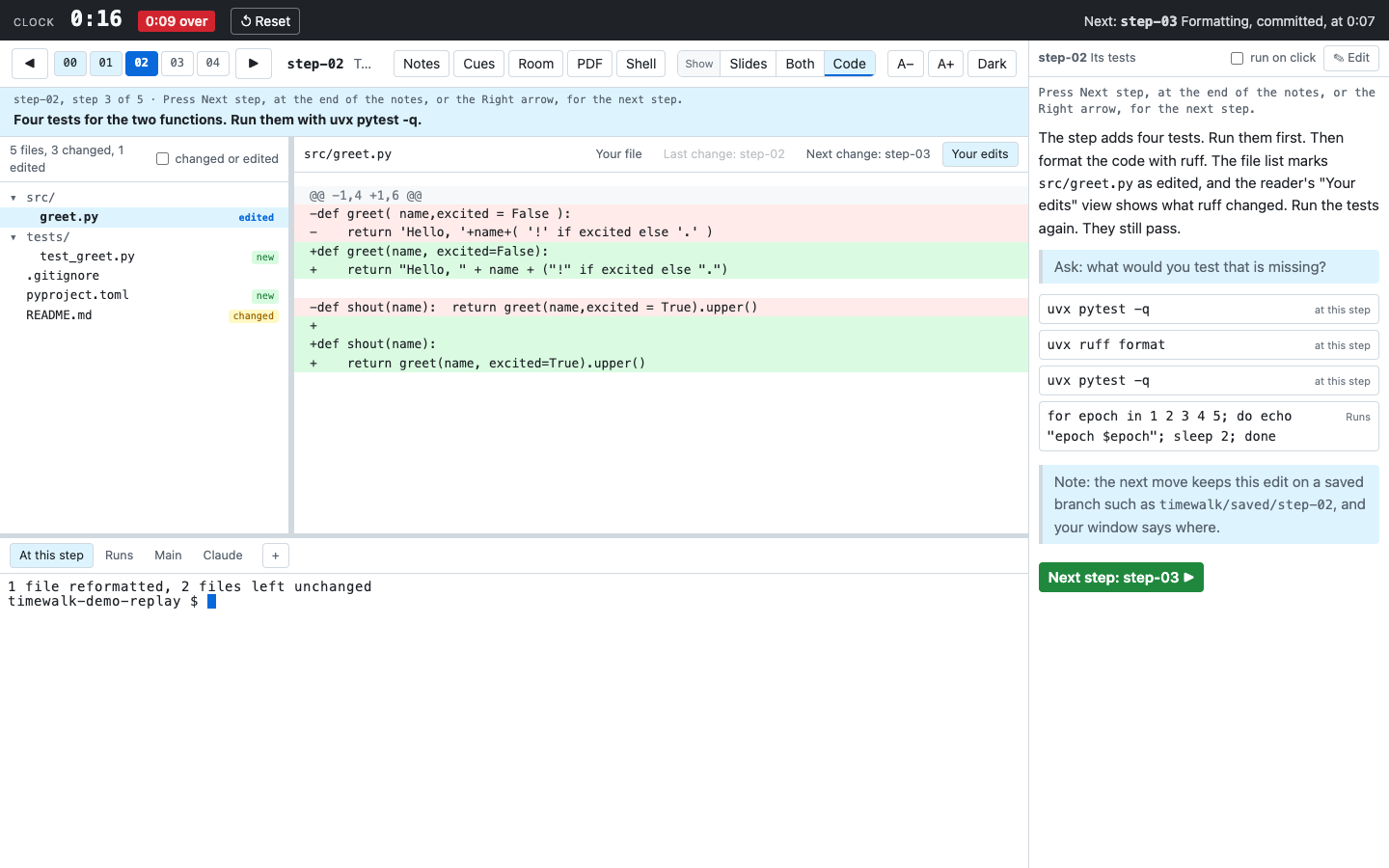
If you run the command again, the view shows the new edits. If you undo the edits with git restore .,
the marks go away. The reader then shows the file again.
The views and the kinds of change
| View | Compares | Answers |
|---|---|---|
| Last change | the step before, and the commit of this step | What did the history do here? |
| Next change | the commit of this step, and the next step | What will the history do next? |
| Your edits | the commit of this step, and the files on the disk | What did we do in the room a moment ago? |
| Your file | nothing | What is in the file now? |
At step-03 of the demo, the two kinds of change meet. The Last change view of greet.py is
the same change that ruff made live in front of the class at step-02.
Moving with edits
Edits belong to the step where you made them. So before a move, timewalk keeps your work on a saved branch
in the replay copy, and then moves. The move does not ask. A saved branch is a branch with a name of the form
timewalk/saved/<place>. The place is the step or the move where you made the work, for example
timewalk/saved/step-02. A second save at the same place gets -2, then -3.
The windows then say where your work is. The Room window does not, so the class sees only the move. ✕ Close hides the notice in its window.

The notice gives two commands. Run them in a terminal at the step:
git show timewalk/saved/step-02                        # see the work
git restore --source timewalk/saved/step-02 -- src/greet.py   # bring one file back
The saved branch holds these things, oldest first:
-
Your commits since the last move. See The replay copy.
-
What you staged with
git add, as a commit of its own, if there is any. -
Your edits to tracked files, as a commit on top of it.
-
Every untracked file in the way of the move, in the same commit as the edits. An untracked file is a file that git does not record. A file is in the way of a move in these cases:
- The new step has a file of the same name.
- The new step has a folder of that name.
- The new step has a file where the path of the untracked file has a folder.
timewalk keeps such a file whether git ignores it or not. Where git ignores the case of names, for example on a Mac,
Notes.mdandnotes.mdare the same name.
Every other untracked file stays where it is, and the saved branch does not hold it. For example, .venv
and the outputs of a run stay on the disk through every move.
The save does not change your files, the index or the stash. The index is the list of changes that the
next commit holds, which git add fills. After the save, the move puts the step in place of your work.
If a rebase, git am, a cherry-pick or a revert is half done, timewalk ends it, because the work is now on the
branch. What timewalk does with git gives each part of the
move, in order.
A git repository of its own inside the replay copy cannot go on a branch. If such a folder is in the way, timewalk stops the move and names the folder. Move the folder out of the replay copy, and move again.
With --in-place
With --in-place, the edits are your real work in your repository, and timewalk writes no branch there.
So a move with edits asks first.

- Stay here leaves everything as it is.
- Set the edits aside and move runs
git stashand then moves. The stash keeps the edits aside, with the label of the step, for exampletimewalk: edits made at step-02. To bring the edits back, rungit stash listandgit stash popin a terminal.
With --in-place, an untracked file in the way stops the move, ignored or not. The
message names the file. A replay copy that an older version made as a worktree works in the same way. See
The replay copy.
With --discard-edits
The replay copy no longer needs --discard-edits, because a move keeps the edits and does not ask. With a
replay copy that is a clone, timewalk prints a line that says so, and the flag changes nothing.
The flag still works on a replay copy that an older version made as a worktree. There, a move runs
git checkout --force and throws the edits away. The step bar then says “Moves discard edits”. With edits,
the label becomes a red warning with the number of edited files. timewalk refuses to start with both
--discard-edits and --in-place.
What counts as an edit
An edit is a change to a tracked file, which is a file that the commit of the step has. A command can
also write new files, for example a .venv, a database or the output of a run. Git does not track these
new files. They are not edits, and the page does not show them. A move leaves them where they are, but
first keeps a file in the way on the saved branch. See The replay copy.
timewalk does not watch for edits in the repository of the Main tab, because the page never shows that repository. See The terminals.
How it works
The edits watcher is the part of the server that looks for edits. It checks the replay copy once a second
with git status, and it also checks the size and time of each edited file. When anything changes, the
server tells every window. The diff comes from git diff HEAD -- <file> in the replay copy.