A tour of the demo
The demo is a small project, timewalk-demo, with five
steps. In the demo, two Python functions arrive untidy. Then they get tests, then formatting, then types
and documentation. timewalk holds the demo as a git submodule in demo/timewalk-demo. The notes of the
demo are in demo/notes.md, and its slides are in demo/slides/.
just demojust demo starts timewalk with --clock. A move never asks about what you type in the tour. It keeps
your edits on a saved branch in the replay copy. Open the address in a window on the projector, and in a
second window on your own screen. Each step below says what to look at and what to try.
step-00: an empty project
The project has a README and a .gitignore. The step bar shows five step buttons. The status band under
the step bar says what to do now, and then gives the message of the tag.
- Press Right to go to the next step. Press Left to come back.
- Open the Main tab, and run
git log --oneline --decorate.
The log shows the whole history of the repository that you started from. The replay copy stays at step-00.
step-01: a file arrives
src/greet.py arrives in its first form, with odd spacing, mixed quotes and a function on one line. The
file list marks it new.
- The step has two slides. Press Down and Up to move between them.
- Click
greet.pyto read it. - Try Slides, Both and Code at the top right.
step-02: its tests, and a formatter run live
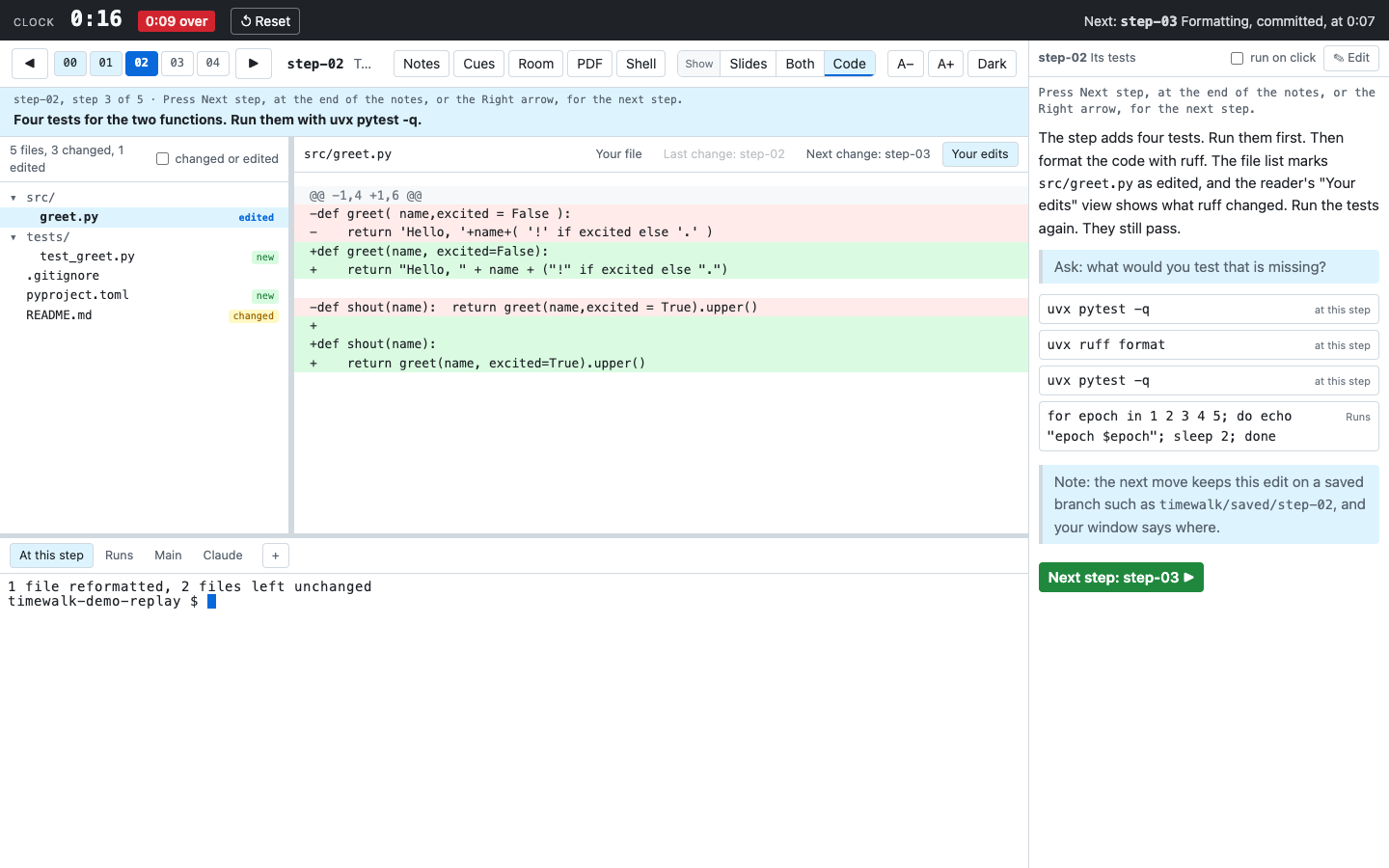
The step adds four tests and a pyproject.toml, which tells pytest where the code is. The code is still
untidy.
- In the notes column on your screen, click
uvx pytest -q. The command appears in the terminal in every window. Press Enter to run it. - Click
uvx ruff format, and press Enter. Within one second, the file list markssrc/greet.pyedited. - Look at the reader. It now offers Your edits, which shows exactly what ruff changed. See Live edits.
- Press Right. The move does not ask. It keeps the edit on a saved branch, for example
timewalk/saved/step-02, and each window says so. A Room window does not. See Live edits. - In the terminal at step-03, run
git showwith the name of the branch from the notice. It shows the edit again.
step-03: the formatting, committed
The history now has the change that ruff made live, with its rule in pyproject.toml. The step shows a
document instead of slides. A document is one longer Markdown page that scrolls. See
Slides and documents.
- Open
src/greet.py, and choose the view Last change.
The changes match what the class saw ruff do at step-02.
step-04: types and docs
Each parameter gets a type and a comment. Each function gets a docstring of one line.
- Open
greet.py, and choose the view Last change. The view shows how the signature grows. - In the notes column, click
uvx pytest -qagain, and press Enter. The tests show that the behaviour did not change.
What the demo is made of
| Part | Where |
|---|---|
| The history | github.com/rahuldave/timewalk-demo, with five commits and five annotated tags |
| The notes | demo/notes.md, with one section for each step, and times and commands |
| The slides | demo/slides/talk.md, a picture, and formatting.md, which is the document at step-03 |
| The manifest | demo/slides/slides.toml, which says which slides go with which step |
The demo has no justfile, so the page shows no recipe buttons. The commands of the demo use
uvx. uvx runs ruff and pytest, and you do not need to install them.